
It can be surprisingly intimidating to begin writing your first blog post. You may have one specific idea in mind, but when you look at that blank editor, you can’t decide where to start, what to include, or if it will even turn out as a good article.
You don’t need to be a blogging expert to write your first post — it just needs a clear purpose, a useful topic, a sensible structure, and sufficient editing to make your first blog post easy to read and understand. This guide shows you how to write a first-blog-post article — from choosing an idea to publishing and reviewing your blog article.
Start With One Clear Topic
The simplest way to make your first article hard to follow is to try to cover too broad a topic. Avoid the temptation to write about everything related to blogging — narrow the focus to one question, one problem, or one task.
e.g.
- How to choose a blog topic as a beginner
- How to create a blog post outline
- Common mistakes new bloggers make
- How to organize blog post ideas
- How to write your first blog post
Having a focused topic makes it simple for the reader to know what you want them to learn.
Before finalizing your idea, consider:
- What problem am I trying to solve?
- Who would find this information useful?
- Can I explain the subject clearly?
- Does the topic fit my website?
- Can I provide genuinely useful information, rather than repeating what other articles say?
Your first blog post doesn’t need to be about an entire subject — it just needs to do one thing well.
Understand Who You Are Writing For
Once you have a topic, consider the person who will be reading it. A beginner and an experienced blogger may search for the same subject, but they will need very different explanations. If your audience is new to blogging, complex jargon and advanced strategies will make your article even harder to understand.
Consider a reader’s situation:
- What do they already know?
- What are they trying to accomplish?
- Where are they likely to get confused?
- What questions might they have next?
- What would make the task easier for them?
Try imagining that you are explaining the subject to one real person — rather than writing for an anonymous audience. You’ll find that it’s much easier to sound natural and say something that the reader will actually want to read.
Decide What the Reader Should Learn
Before you write, finish this sentence:
“After reading this article, my reader should be able to…”
For a “first-blog-post” guide, you could use:
“After reading this article, a beginner should know how to choose a topic, plan the article, write the draft, edit it, and prepare it for publication.”
This will give your article a purpose — and whenever you consider including new information, ask yourself if it contributes to your goal. If it doesn’t directly help a reader achieve your goal, you’re better off leaving it out or saving it for a later article.
Do Basic Keyword Research
If you want your article to be discovered by search engines, you’ll need to complete some keyword research.
For this topic, the primary focus keyword would be:
how to write your first blog post
Other related search terms could include:
- writing your first blog post
- first blog post for beginners
- how to write a blog post
- blog post writing tips
- how to create your first blog post
You don’t need to use every related phrase in your article — just use words and phrases that make sense in the text. A good rule of thumb is to avoid overstuffing your text with unrelated terms simply for the sake of SEO. A useful article should still make sense if the reader isn’t actively thinking about SEO.
Create An Outline Before Writing
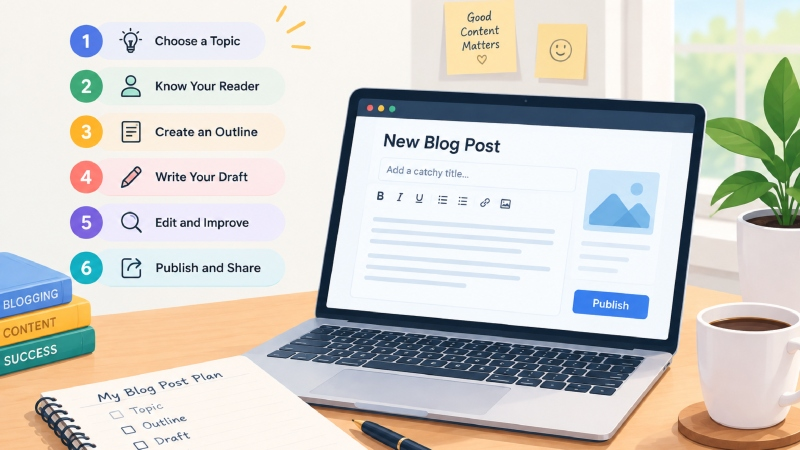
An outline is your ideas’ home before you start writing the post. It doesn’t need to be anything fancy — a simple outline for your first post could be as simple as:
- Introduction
- Choose a topic
- Understand the reader
- Research the subject
- Create an outline
- Write first draft
- Edit and improve
- Add useful links and visuals
- Check basic SEO
- Publish and review
Under each heading, write a few notes about what you want to say. This will help ensure you have enough to say while avoiding the dreaded blank-page panic.
Most importantly, it protects you from having:
- Repeated ideas in different sections
- Unrelated information that doesn’t serve your topic
Research The Topic Before You Draft
Good writing often begins with good preparation. Before writing your first draft, understand the topic from the reader’s point of view. Know which questions need answering and which parts of the topic need explaining. If you use information from other websites, avoid simply copying their paragraphs — research the subject, understand the information, and explain it in your own words.
Also double-check important facts before publishing this article, especially if it contains statistics, product information, technical instructions, dates, or any claims that could change over time. Research should help you understand the topic better — not give you an article template to copy.
Create A Working Title First
Your title doesn’t need to be brilliant — it just needs to help keep you focused while writing the article.
For now, a simple working title such as:
How to Write Your First Blog Post is enough to get you started. Once you’ve finished the article, you can tweak it if you want a more compelling title. A good title should clearly describe what the reader will find on the page — and avoid including information that the article doesn’t actually have.
Write An Introduction That Gets To The Point
Your introduction should help the reader achieve three simple goals:
- Know what this article is about
- Know why they should read this article
- Know what they will learn from this article
- Avoid long-winded intros before getting to the point
For example, a bad introduction would sound like this:
“Writing your first blog post can be confusing when you’re not sure where to start. This guide explains how to choose a useful topic, organize your ideas, write your draft, edit it, and prepare your first post for publication.”
That’s all you really need to establish the purpose of the article and convince the reader that they want to keep reading.
Write The First Draft Without Thinking About It Being Perfect
This might be the most terrifying part of the process for new writers. They write a sentence, delete it, write a new sentence, and spend 10 minutes agonizing over a paragraph that will ultimately be deleted anyway.
Avoid this by separating the writing and editing stages. While writing your first draft, focus on getting your ideas across the page.
Try to:
- Explain one main idea at a time
- Say what you would normally say when speaking
- Use examples to help clarify complex ideas
- Follow your outline
- Avoid repetition
- Keep the reader’s problem in mind
And if you get stuck, imagine someone has asked you the question and write what you would say to them. You can always fix the text later — this is just the first draft.
Make the Article Easy to Read
A good article can still be challenging to read if it’s just one long wall of text. Break the content up into manageable sections using descriptive headings. You should also use short paragraphs and lists when appropriate — for example, a numbered list is almost always easier to read than a long paragraph of text. Formatting should make the information more accessible — not simply make the page look longer.
Add Real-Life Examples When They Help
Examples can often turn a generic statement into something a beginner can actually use. Instead of telling the reader to choose a specific topic — explain that a beginner could write about “how to organize daily tasks with a to-do list” instead of a broad topic like “productivity”.
The second option gives the reader something they can actually use. Whenever possible, add your own examples, observations, testing, or explanations. They can help make an article more useful and give the reader a perspective that isn’t just a generic “SEO-friendly” guide.
Add Useful Images or Other Visuals
Your blog post doesn’t need an image after every paragraph — but you should use visuals when it helps the reader understand the topic or makes an important point stand out.
For a beginner’s blogging guide, useful visuals might include:
- A blog-post planning graphic
- An example outline
- A writing editor screenshot
- A publishing checklist
- An original illustration
Avoid inserting unrelated images simply to fill space, and always remember to give images a meaningful filename and alt text if you want them to appear in search results.
Add Internal And External Links Naturally
Links can make an article more useful by guiding the reader to other relevant pages.
Internal links
These are links to other pages on your website. For example, if your website publishes an article about blog post research in the future, you could insert an internal link in this article where appropriate. This will help both the reader and search engines understand the context of the link.
External links
When writing your article, external links can be a great way to give the reader more information about your topic. Do not use external links simply to bloat the page with random backlinks — every link in the article should have a reason for being there.
Write a Clear Conclusion
Your conclusion should help your reader reach a clear ending point. Simply summarize the article process and give the reader a practical next step. For example, after explaining how to plan and write a first blog post, you could encourage the reader to choose one topic and create a simple outline today.
You don’t need to repeat every word of the article — a summary is sufficient to remind the reader of the steps without boring them by re-reading the entire text.
Edit Your Draft Before Publishing
Your first draft is not your final draft — and that’s perfectly fine. If possible, try to set the draft aside for a while before returning to edit it. You are much more likely to spot issues when you’re not distracted by the sentence you just wrote.
Proofread carefully for:
- Poor grammar
- Repetition
- Weak or confusing sentences
- Unnecessary information
- Unproven or unsupported claims
- Broken links
- Poorly structured paragraphs
- Sections that do not directly answer the reader’s question.
Reading the article aloud is always a good way to spot weak or unnatural-sounding sentences.
Check The Article From The Reader’s Point Of View
Before publishing, reread the article as if you’ve never seen it before.
Ask yourself:
- Did I get the answer I came for?
For this topic, a reader searching for “how to write your first blog post” might want to know:
- What should my first post be about?
- How do I plan it?
- How should I structure it?
- What should I put in the introduction?
- How do I make it easy to read?
- Should I use keywords?
- What should I check before publishing?
Your article doesn’t need to contain every possible answer to every possible blogging question — but it should satisfy the main intent behind the search rather than going off-topic.
Do Basic SEO Checks Before Publishing
SEO should support the article, rather than dictate what you write.
Before publishing, check that you have:
- One clear H1
- Descriptive H2 and H3 headings
- A simple, relevant URL
- A useful meta description
- Natural use of the topic focus
- Relevant internal links
- Descriptive image alt text
- A clear introduction
- Content that matches the reader’s search intent
- Avoid forcing the focus keyword into every heading and paragraph of the article
Aim for natural-sounding writing — Google’s current official guidance focuses more on helping people than manipulating search engine algorithms by artificially inflating keyword density.
Do Not Add Words Just to Make the Article Longer
A common beginner question is, “How many words should my first blog post have?” There is no magic word count that determines whether an article is good or not. A short article can still be useful if it completely answers the question, while a longer article can be frustrating if most of it is repetition.
Rather than focusing on how many words you should have, focus on providing the reader with the information they need — and stop writing when you’ve said it all. Once you’ve truly explained what a reader needs to know, avoid adding extra paragraphs simply to increase the word count.
Use AI Carefully (If At All)
AI can be a powerful tool during the blogging process, but it should not replace your own judgment when it comes to the final article.
For example, you could use AI assistance to:
- brainstorm ideas
- create an outline
- identify weak or unclear sections
- or suggest improvements to generic-sounding sentences
However, AI should never replace your responsibility for the final article.
If you use AI assistance, always:
- Check factual claims
- Rewrite generic-sounding sections
- Add your own relevant examples or explanations
- Remove unnecessary repetition
- Ensure the article actually helps the intended reader
- Review the final article before publishing
The goal should be a helpful article rather than an AI-generated article that contains randomly generated information
Complete a Final Publishing Check
Before hitting the Publish button, take a few minutes to complete a final check of the entire page.
Content
- Does the article answer one clear question?
- Is the information useful and easy to understand?
- Have I removed repeated information?
- Are important claims double-checked?
- Does the conclusion feel complete?
SEO
- Is the title clear?
- Is the URL relevant?
- Is the meta description written naturally?
- Is the focus topic used naturally?
- Are relevant internal links included?
Presentation
- Are the headings easy to follow?
- Are the images relevant?
- Is the alt text descriptive?
- Does the page look good on mobile?
- Do all links work?
Trust And Quality
- Is the author clearly identified?
- Have I avoided unsupported claims?
- If I used outside information, have I linked to appropriate sources where useful?
- Does the article offer something genuinely helpful rather than simply rephrasing other pages?
Google’s official article guidelines also recommend presenting clear article information, such as providing the headline, relevant image, publication/modification information, and author details using appropriate article markup.
Publish Your First Post
Once the article has been reviewed, publish it. Avoid repeatedly editing a finished article forever because you’re worried it’s not “perfect.” Your first post is also a chance to learn
Once it’s published, visit the live page yourself and check that:
- The article loads correctly
- The title appears correctly
- The images display correctly
- The links open correctly
- The page looks good on a phone
- Nothing important was accidentally left out
Share the article through relevant channels where your potential readers are actually present.
What to Do After Publishing
Publishing is only the beginning of the article’s life, rather than the end. As your website grows, you may find that your readers need more information or that a section could be explained better. Keep an eye on the article and update it when you have genuinely useful information to add.
Do not update the article simply to make it look “fresh.” Make changes when there is a real reason, such as correcting information, clarifying writing, adding context, or updating something that has genuinely changed. A good content strategy is built by providing genuinely useful articles and carefully considering improvements, rather than constantly rewriting pages without a reason.
Common Mistakes New Bloggers Should Avoid
Your first article does not have to be perfect, but some mistakes are worth avoiding.
Choosing a topic that is too broad
A broad subject can quickly become difficult to organize. Start with one specific reader need.
Writing for search engines instead of people
If keywords make the article sound unnatural, something has gone wrong. Write for the reader first.
Copying the structure or wording of another article
Research is useful, but your finished article should have its own explanation, examples, and organization.
Adding unnecessary information
More information is not automatically better. Keep sections that help answer the reader’s question.
Skipping the editing stage
Even strong ideas can look unprofessional when the draft contains repeated points, unclear sentences, or basic errors.
Waiting for perfection
Your first article is where you begin learning. You can improve your writing with every post you publish.
Final Thoughts
Learning how to write your first blog post is less about finding a magic formula and more about learning how to serve a reader. Choose one focused topic, understand who you’re writing for, research what you need to know, and write a first draft that doesn’t try to be “perfect”.
Then, edit the article carefully, double-check the important details, add links and visuals where appropriate, and ensure that the final page answers the question it promised to answer. Your first post may not be your best post — and that’s completely fine. The most important thing is to provide something genuinely useful, learn from the experience, and make the next article even better.
Frequently Asked Questions
What should I write about in my first blog post?
Choose a specific question, problem, or task that is relevant to your intended audience. A focused topic is usually easier to research, organize, and explain than a very broad subject.
Do I need SEO knowledge before writing my first post?
No. Basic SEO knowledge is helpful, but you can start by learning how to create clear and useful content. SEO skills can develop alongside your writing.
Should I use AI to write my first blog post?
AI can help with brainstorming, outlining, and editing, but the finished article should be carefully reviewed. Add your own judgment, examples, and useful information rather than publishing unedited AI-generated text.
What should I do if my first blog post is not perfect?
Publish it once it is accurate, useful, readable, and properly checked. You will learn more by writing and improving real articles than by waiting indefinitely for your first post to be perfect.
Disclaimer: This article provides general educational guidance about writing and publishing blog content. Search visibility can vary by topic, audience, competition, and content quality, so no specific traffic or ranking result is guaranteed. Have a question or suggestion? Get in touch with us.

Erin Durkheim is a digital content writer and researcher focused on blogging, technology, AI tools, and practical digital guides. Through BloggingHut, Erin shares clear, useful, and easy-to-follow information to help readers learn new tools, improve their digital skills, and work more effectively online.